Fraud Alert: Impersonation Scams

In this post, we’ll explain how impersonator scams work, how to recognize the red flags, and most importantly, how to protect yourself and your accounts.
What’s an impersonator scam?
Fraudsters can mask their phone numbers and email addresses to look like they are contacting you on behalf of someone at First Bank. They will ask you to validate your account by providing your online banking username, password, or secure access code. With this information, they could attempt to hack into your account.
How to avoid this scam:
To keep your accounts safe, remember that First Bank will never ask you for a security code, multifactor authentication code, username, or password. Your login credentials should never be shared with anyone.
If someone contacts you from First Bank and asks for any of this information, hang up and stop all communication immediately. Manually dial our customer support team at 1-866-792-4357 and report the incident.
What does an impersonator scam look like?
Impersonator scams start with a phone call, text message, or email that appears to come from a trusted source—like First Bank, a government agency, or a well-known company. The scammer will spoof the caller ID or email address to make it look legitimate. Here’s an example of what a fraudulent text message could look like. Notice that the text message on the left asks for User ID and the other is prompting you to click a fraudulent website link.
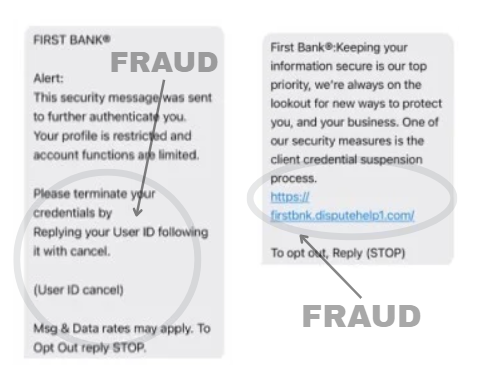
The scammer will create a sense of urgency or a situation where you need to take some sort of action – like replying to a text message or clicking a link. From there, they will ask for sensitive details like your online banking username, password or a secure access code. These scams can be highly convincing, often using official sounding language.
Stay Vigilant, Stay Secure
Impersonator scams are designed to catch you off-guard, but with awareness you can stay one step ahead. Always remember: First Bank will never ask for your login credentials, secure access codes, or personal information through unsolicited calls, texts, or emails. If something feels off, trust your instincts—hang up, don’t click, and contact us directly.
For additional security tips on how to protect your accounts, spot the warning signs, and protect yourself against scammers, visit our Fraud Resources page.