Remote Deposit Capture: August 2025 Update
To ensure utmost security and functionality, First Bank Remote Deposit Capture services will receive a software update on August 19, 2025.
Here’s what you need to know.
What: Remote Deposit Capture (RDC) services are receiving a software update.
When: August 19, 2025
New Look: Once the software update is complete, RDC clients will notice a more modern looking online dashboard when making remote deposits in online banking. You can preview those changes in our updated Remote Deposit Capture Demo.
See the new look
You may need to refresh your check scanner.
Clients who use a check scanner may be prompted to refresh their scanning device. Follow these steps.
- Load the capture page to scan a check.
- If you receive the following message(s): “A new version of the Scanner Service has been detected. Please wait…” or “The latest version of the Scanner service has been downloaded. The Scanner Service update is initiating.”, this means that the service will attempt to update.
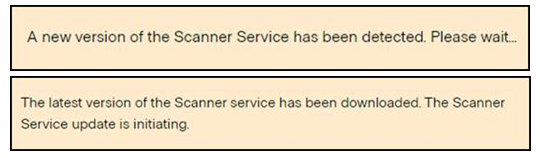
- You’ll see another message with a progress indicator.

- Once the update is 100% complete and you receive a message that says “Place documents in the scanner, and click the Scan button.”, the scanner service update was successful. Scan checks as normal.

Check Scanner Troubleshooting Tips:
When you load the capture page to scan a check, if you receive either of the following error messages: “Error The scanner is not valid” or “Error The local scanner service is not running. Please install / reinstall or start / restart the scanner service.” and/or if the scanner buttons are grayed out, you will need to follow the below steps to resolve the issue.

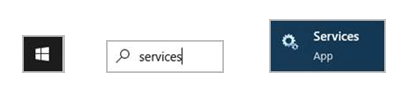
- Click the Windows Start menu, type services, select ‘Services’.
- Right-click on each of the following Services and choose Start/Restart for each.
Deposit 24-7 Scanner Service
Deposit 24-7 Scanner Service Refresh
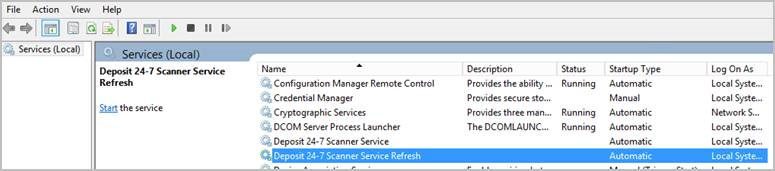
- If Start/Restart is grayed out, IT will be required to run Services as administrator. If the options are not grayed out and you receive an error that access is denied, you will need IT.
Time for a new check scanner?
First Bank offers and recommends the following models of check scanners:
- Digital Check CX30
- Digital Check TS240
- Panini VisionX
If you are currently using a different model, it will likely continue to work as usual following the August 19 software update. However, we cannot guarantee that those manufacturers will continue to update the necessary drivers for the scanner to operate with future software updates. To replace an outdated scanner, contact your Treasury Rep or Business Support for purchase information.